
Mere ek client hain – Raipur mein ek dermatologist. Achha practice hai, patients khush hain. Lekin online? Zero presence.
Ek din unhone call kiya: “Rohit bhai, ek patient bola ki usne mujhe Google pe dhundha – lekin meri clinic ka number hi galat tha listing mein. Patient kisi aur ke paas chala gaya.”
Woh unverified Google Business Profile thi – jo Google ne khud bana di thi, incomplete aur galat information ke saath.
Us din humne unka Google Business Profile properly setup kiya. Sirf ek hafte baad – “Raipur dermatologist” search karne pe woh Google Maps pe top 3 mein aa gaye. Appointments 40% badh gayi.
Bina ek bhi rupaye ke advertising ke.
Google Business Profile – yeh free tool hai. Lekin 40% se zyada businesses abhi bhi iska sahi use nahi karte. Aur jo karte hain – woh apne competitors se clearly aage hain.
Google Business Profile kaise setup karein – yeh guide aapko exactly woh sab kuch batayegi. Har step practically. Raipur aur India ke context mein.
Chalo shuru karte hain.
Table of Contents
Google Business Profile Kya Hai?
Google Business Profile (GBP) – pehle iska naam “Google My Business” tha – ek free tool hai jo Google deta hai local businesses ko.
Jab koi “gym” ya “restaurant Raipur” search karta hai – woh map aur listing jo dikhayi deti hai? Woh Google Business Profile hai.
Yeh aapka digital storefront hai. Customer yahan se:
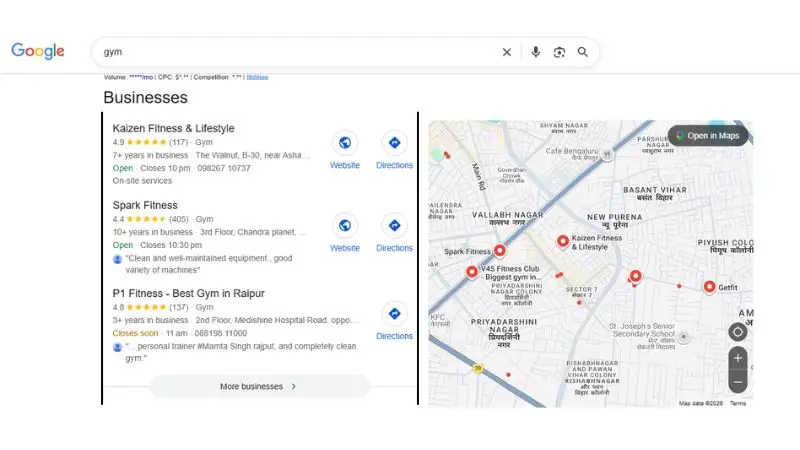
- Aapka address aur directions leta hai
- Phone number pe directly call karta hai
- Reviews padhta hai
- Photos dekhta hai
- Working hours check karta hai
- Website visit karta hai
Aur yeh sab Google Search aur Google Maps – dono pe dikhayi deta hai.
Google Business Profile Kyun Zaroori Hai? – 4 Real Reasons
Reason 1: “Near Me” Searches Explosively Grow Ho Rahe Hain
“Raipur mein CA near me”, “best hospital near me”, “grocery shop near me” – yeh searches har saal 200%+ grow kar rahe hain.
Agar aapka GBP nahi hai – aap in searches mein exist nahi karte.
Reason 2: Local Pack Mein Aana = Free Traffic
Google Search results mein ek “Local Pack” hota hai – woh top 3 businesses jo map ke saath dikhte hain. Yeh positions paid ads se bhi zyada prominent hote hain.
Aur yeh completely free hain – sirf properly optimized GBP chahiye.
Reason 3: Trust Instantly Build Hoti Hai
Ek complete GBP profile – photos, reviews, accurate hours – customers ko instantly trust deta hai. Bina GBP ke business aaj ke digital world mein “suspicious” lagta hai.
Reason 4: Competitors Pehle Se Wahan Hain
Raipur mein aapke competitors ka GBP already exist karta hai – chahe unhone setup kiya ho ya na kiya ho. Google khud unverified listings bana deta hai.
Agar aapne claim nahi kiya – koi bhi galat information enter kar sakta hai aapki listing mein.
Google Business Profile Setup – Step By Step
Step 1: Google Account Ready Karein
Sabse pehle ek Google account chahiye.
Business ke liye dedicated account best practice hai – gmail.com pe naya account banayein jaise example@gmail.com.
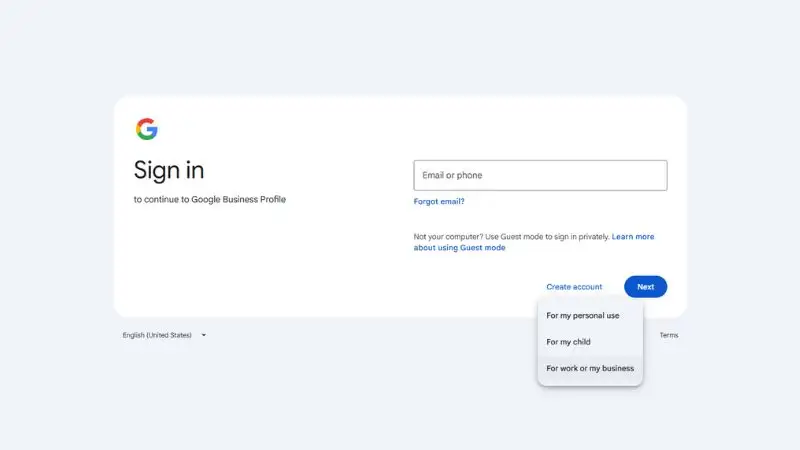
Agar already hai – directly Step 2 pe jaayein.
Step 2: Google Business Profile Page Pe Jaayein
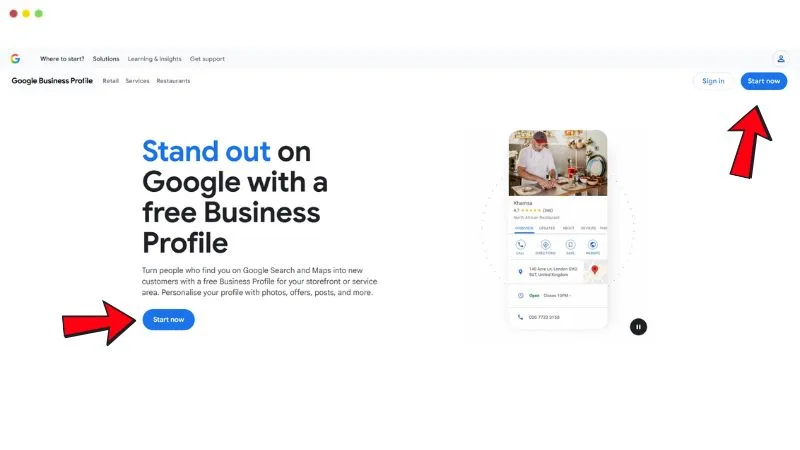
Browser mein type karein: business.google.com
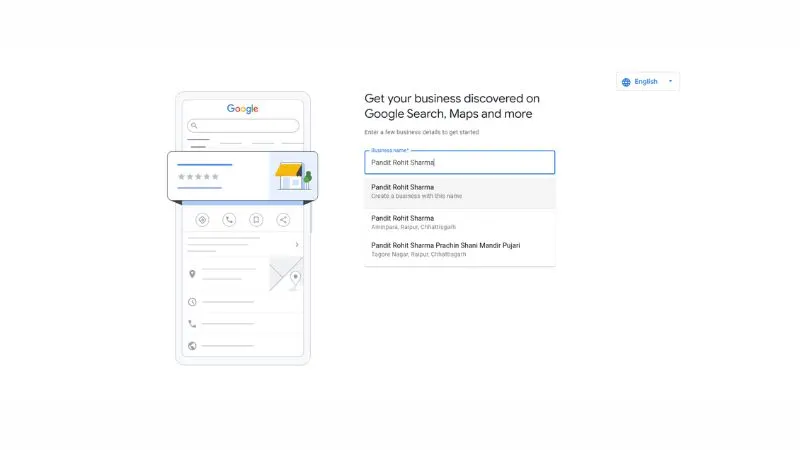
Page khulega – “Get your business discovered on Google Search, Maps, and more” likha hoga.
“Start now” button pe click karein.
Step 3: Business Name Search Karein
Pehli screen pe ek search box dikhega – “Business name” field.
Apna business naam type karein. Jaise screenshot mein “Pandit Rohit Sharma” type kiya gaya.
Dropdown mein teen options aa sakte hain:
- “Create a business with this name” – bilkul naya profile banana hai
- Existing listing (same naam, address ke saath) – agar already koi listing hai to woh dikhegi
⚠️ Dhyan rakhein: Name mein keywords mat thosein. “Sharma SEO Agency Raipur Best” – yeh Google suspend kar sakta hai. Sirf actual naam likhein jaise signboard pe hai.
Step 4: Business Type Choose Karein
Agle screen pe likha hoga – “Choose your business type”
Teen options dikhenge:
- Online retail – website se products bechte hain
- Local store ✅ – customers aapke paas physically aate hain
- Service business – aap customers ke paas jaate hain
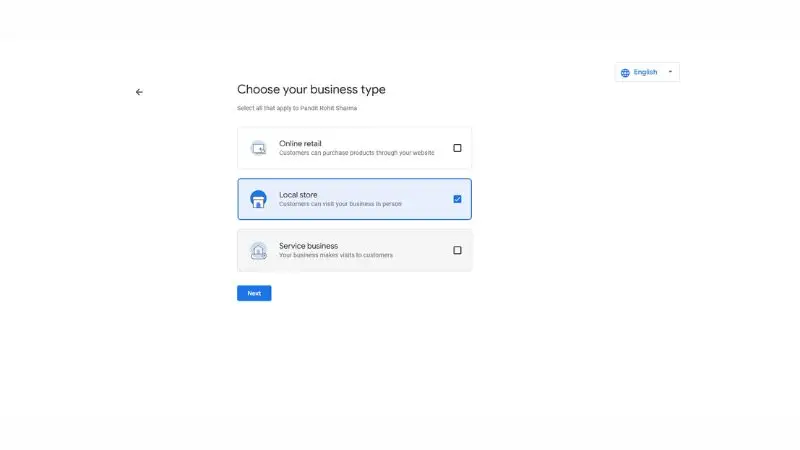
Screenshot mein “Local store” selected hai – blue tick ke saath. Apne business ke hisaab se choose karein.
Ek se zyada bhi select ho sakta hai – jaise Local store + Service business dono.
Next press karein.
Step 5: Business Category Enter Karein
Ab ek search box aayega – “Enter a business category”
Yahan apni main category type karein. Google suggestions dega – unme se sahi wali choose karein.
Examples:
- Digital marketing → “Marketing Agency”
- Restaurant → “Indian Restaurant”
- Doctor → “General Practitioner” ya “Dermatologist”
- CA → “Accounting Firm”
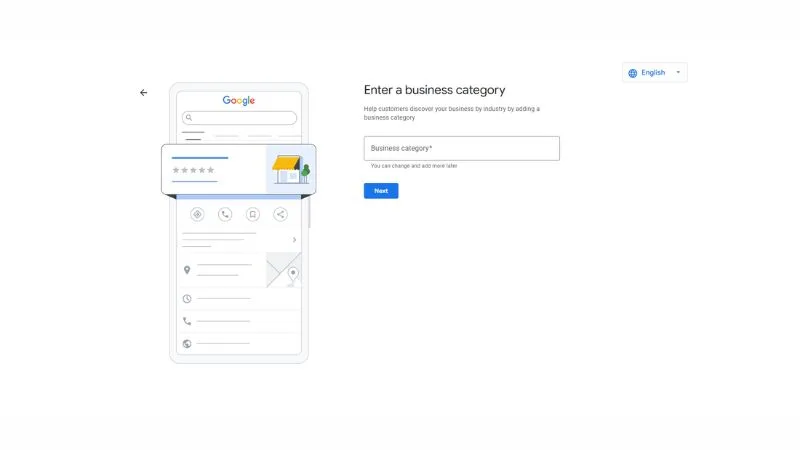
💡 Pro tip: Yeh step ranking decide karta hai. “Raipur digital marketing” search pe dikhna hai – toh category sahi honi chahiye. Sochke choose karein.
Next press karein.
Step 6: Business Address Enter Karein
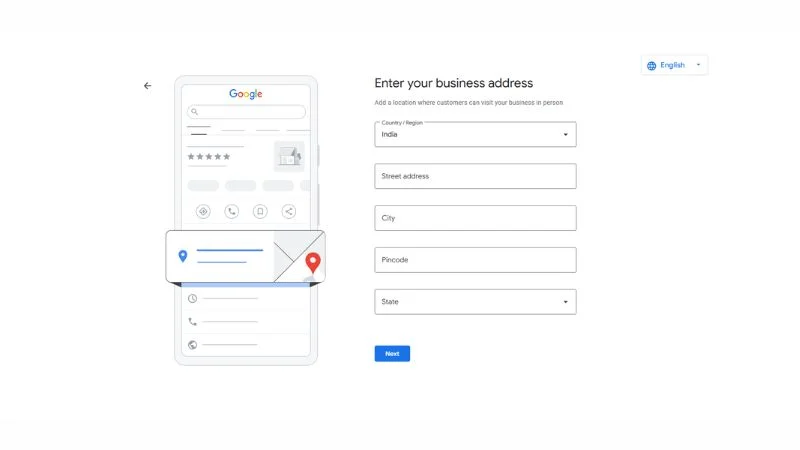
Screen pe likha hoga – “Enter your business address”
Form mein yeh fill karein:
- Country/Region: India ✅ (already hoga)
- Street address: Gali number, building name, mohalla
- City: Raipur
- Pincode: Apna area ka pincode
- State: Chhattisgarh
Sab accurately fill karein. Ek bhi galat detail – Google Maps pe galat location dikhegi.
Next press karein.
Step 7: Is This Your Business?
Address daalne ke baad Google screen pe poochega – “Is this your business?”
Woh nearby existing listings dikhayega – naam aur address ke saath.
Do situations:
Agar aapka business list mein dikh raha hai: Usse select karein. Google ne khud incomplete listing bana rakhi thi – aap isko claim karenge.
Agar nahi dikh raha: “This doesn’t match” ya “Create new” option choose karein.
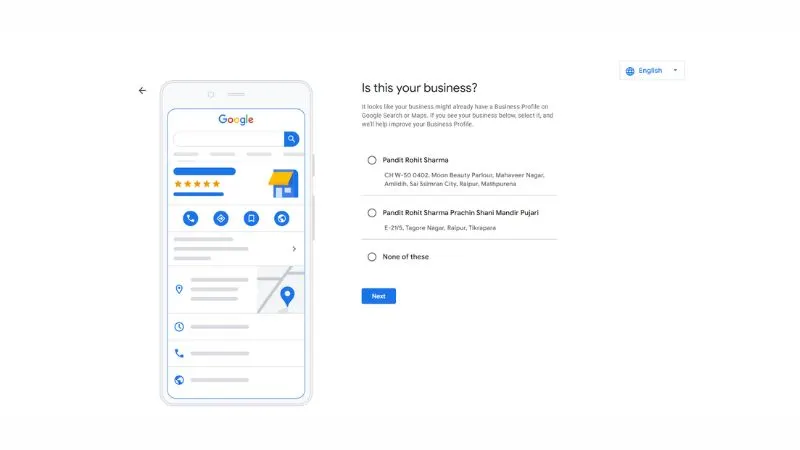
⚠️ Important: Kabhi bhi kisi doosre ki listing claim mat karein. Sirf apna hi business select karein.
Step 8: Map Pe Pin Confirm Karein
Screen pe dikhega – “Place your pin”
Google Maps pe ek red pin dikhega – aapke address ke paas.
Map carefully dekhein – kya pin exactly sahi jagah pe hai?
Agar pin thoda shift hai: “Adjust” button pe click karein. Pin ko drag karke exact location pe laayein – apni building ke upar.
Confirm press karein.
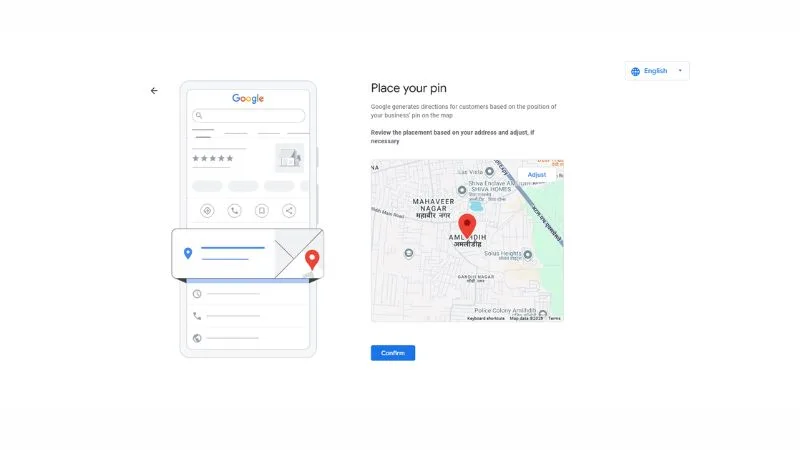
💡 Kyun zaroori hai: Google Maps se customers directions maangte hain. Sahi pin = customer seedha aapke door pe. Galat pin = customer gali mein bhatakta hai.
Step 9: Contact Details Add Karein
Screen pe likha hoga – “What contact details do you want to show to customers?”
Teen fields hain:
Phone number: Apna primary business number. +91 India already selected hoga.
Website (optional): Aapki website ka URL. Abhi nahi hai toh skip kar sakte hain – baad mein add ho jaayega.
Add chat (optional): Text message feature. Customers directly SMS kar sakenge. India mein bahut useful – enable karne ki recommendation hai.
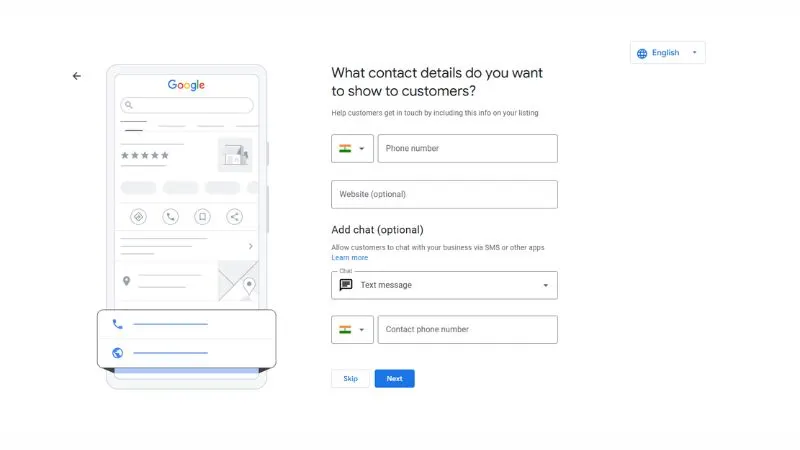
Next press karein.
💡 NAP Consistency: Name, Address, Phone – yeh teeno GBP pe, website pe, aur JustDial pe bilkul same honi chahiye. Farq hoga toh local SEO hurt hogi.
Step 10: Put Your Business On The Map
Agle screen pe likha hoga – “Put your business on the map”
Yeh ek confirmation screen hai. Google batata hai ki aap kya achieve kar sakte hain:
- ✅ Get discovered by people in your area
- ✅ Respond to reviews for your business
- ✅ Manage your business details across Google
Do optional checkboxes hain – news/tips aur surveys ke liye. Choose karna aap pe depend karta hai.
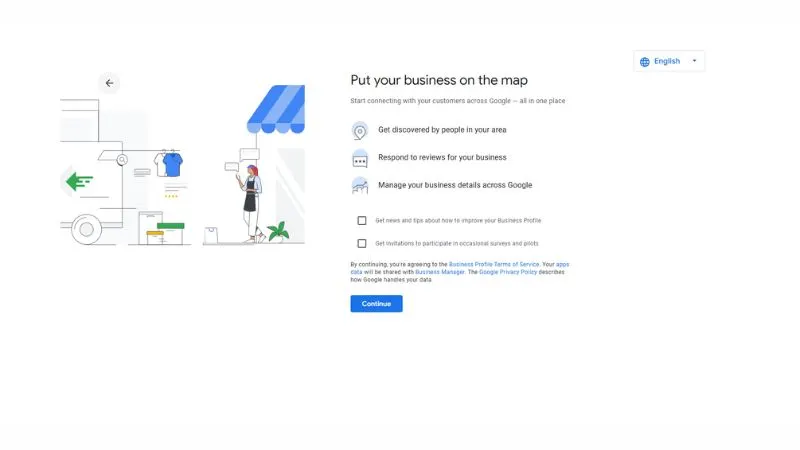
Continue press karein.
Step 11: Verification – Phone Number Se
Screen pe dikhega – “To start verification, enter your phone number”
Apna business ya personal phone number enter karein. Google OTP bhejega.
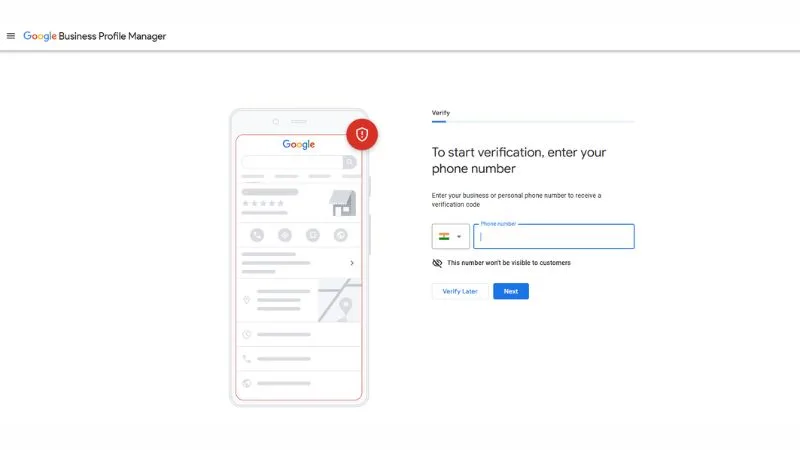
⚠️ Note: Yeh number customers ko nahi dikhega – sirf verification ke liye use hoga.
OTP receive karein → Enter karein → Verified!
“Verify Later” option bhi hai – lekin jaldi verify karna better hai. Verification ke baad hi listing fully live hoti hai Google pe.
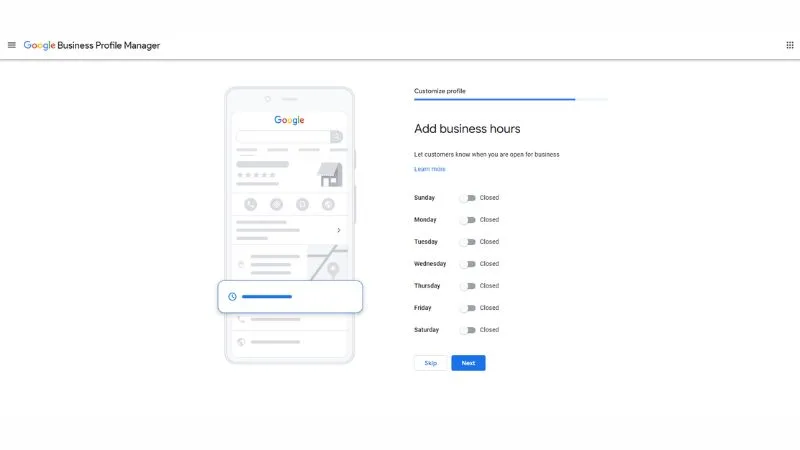
Step 12: Business Hours Add Karein
Verification ke baad “Customize profile” section shuru hota hai.
Pehla step: “Add business hours”
Saat din dikhenge – Sunday se Saturday. Sab default “Closed” rahenge.
Jo din khule hain – toggle ON karein aur opening/closing time set karein.
Example Raipur business ke liye:
- Monday-Saturday: 10:00 AM – 7:00 PM ✅
- Sunday: Closed
Skip mat karein – galat hours se customers door ho jaate hain permanently.
Next press karein.
Step 13: Business Description Add Karein
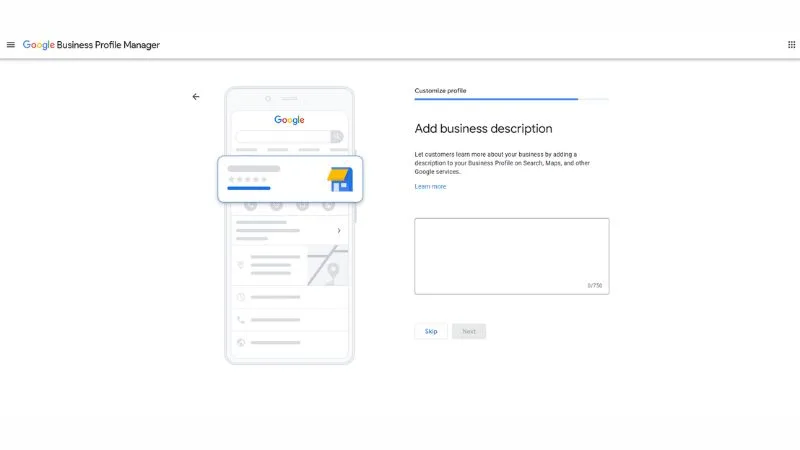
Screen pe dikhega – “Add business description”
750 characters ka box milega. Yahan apna business clearly describe karein.
Ek achhi description ka example: “RaipurTalks Chhattisgarh ki ek trusted digital marketing platform hai. Hum local businesses ko SEO, social media marketing, aur content strategy ke zariye online grow karne mein help karte hain. Raipur ke 100+ businesses ka trust hamare saath hai. Free consultation ke liye aaj hi contact karein.”
Description mein zaroor include karein:
- Aap kya karte hain
- Kahan serve karte hain – Raipur, Chhattisgarh
- Aapki unique quality
- Ek soft call to action
Next press karein.
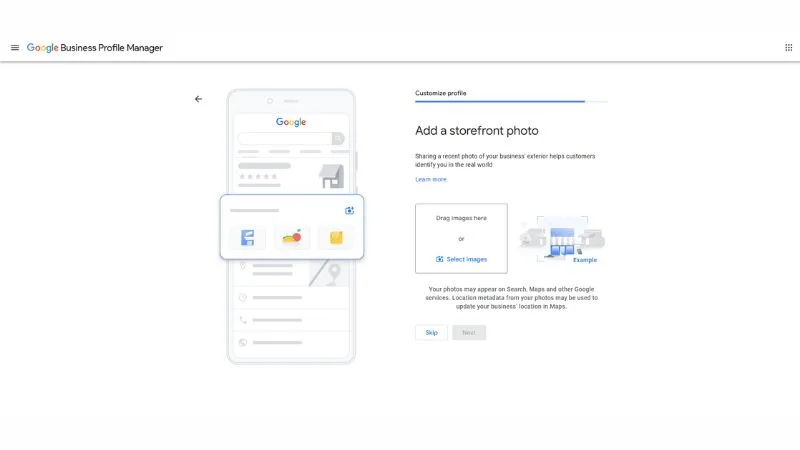
Step 14: Storefront Photo Add Karein
Screen pe dikhega – “Add a storefront photo”
Yahan apni building ya office ki bahari photo upload karni hai. Customers isko dekh ke real world mein aapko pehchaan sakein.
Photo tips:
- Clear aur well-lit honi chahiye
- Signboard visible hona chahiye agar hai
- Minimum 720×720 pixels
- Real photo – stock image nahi
“Select images” pe click karein ya drag and drop karein.
Next press karein.
Step 15: Business Photos Add Karein
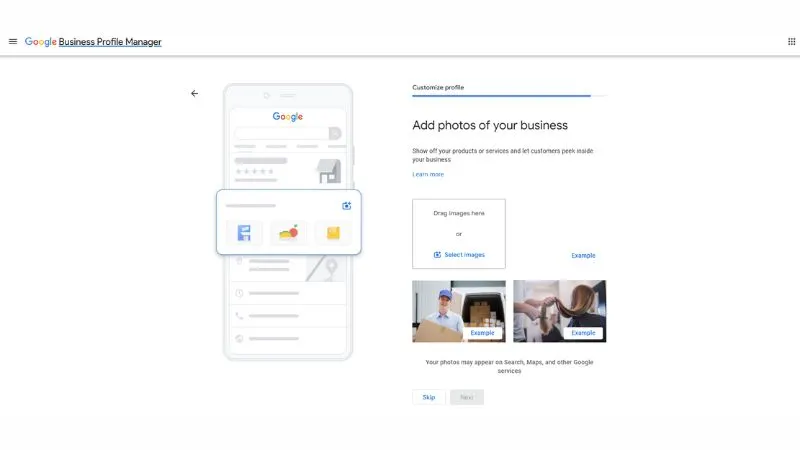
Agle screen pe – “Add photos of your business”
Yahan andar ki photos, team photos, aur services ki photos add karein.
Kya upload karein:
- Office ya shop ka interior
- Team ke saath group photo
- Aapki services ya products in action
- Work environment
💡 Data: Photos wale businesses ko 42% zyada direction requests milti hain compared to bina photos wale businesses ke.
Jitni zyada genuine photos – utna better.
Next press karein.
Step 16: Google Workspace – Skip Karein
Yeh screen dikhegi – “Get a custom domain name for your website and a custom email address”
Google Workspace ka paid promotion hai yeh – custom email (you@yourcompany.com) ke liye.
Agar aapko abhi nahi chahiye – “Skip” press karein. Yeh completely optional hai.
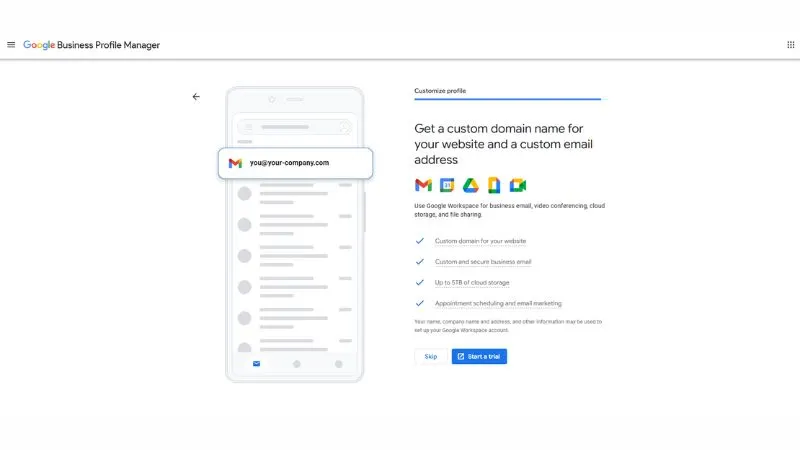
Baad mein kabhi bhi Google Workspace le sakte hain – GBP se iski zarurat nahi hai.
Step 17: Verification Pending – Last Screen
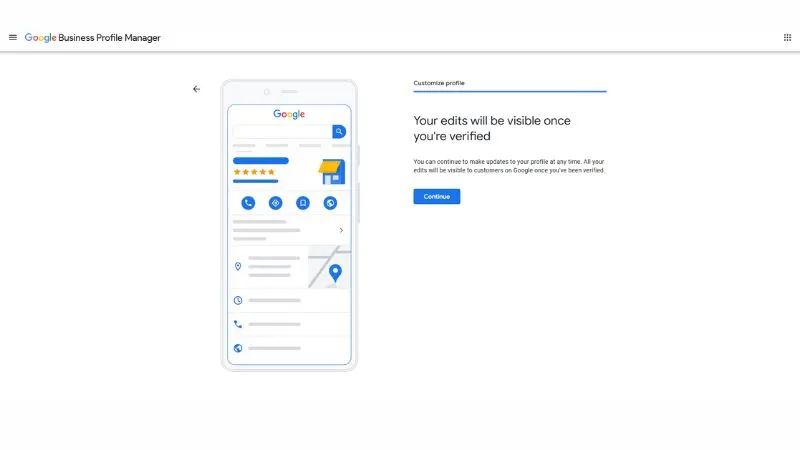
Final screen pe message dikhega – “Your edits will be visible once you’re verified”
Iska matlab:
- Aapka profile successfully create ho gaya ✅
- Saari information save ho gayi ✅
- Verification complete hone ke baad Google Search aur Maps pe live ho jaayega ✅
Continue press karein.
🎉 Badhai ho! Aapka Google Business Profile setup complete hua!
Ab verification ka intezaar karein. Phone OTP se verify kiya hai toh usually kuch ghanton mein active ho jaata hai.
Google Business Profile Optimize Karein – Yahan Asli Game Hai
Setup karna sirf 20% kaam hai. Baaki 80% optimization hai.
Business Description Likhein
GBP mein “Description” section mein 750 characters mein apna business describe karein.
Achhi description ke elements:
- Kya karte hain clearly batayein
- Kisi ko kyun choose karna chahiye
- Unique selling points mention karein
- Location aur service area mention karein
- Naturally keywords include karein
Example (Raipur ke liye): “Sharma Digital Marketing Agency Raipur ki ek trusted digital marketing company hai. Hum local businesses ko Google ranking, SEO, social media management, aur website development mein help karte hain. 5+ saal ke experience ke saath humne 100+ Raipur businesses ko online grow karne mein madad ki hai. Pandri aur Shankar Nagar mein hamara office hai – aaj hi free consultation book karein.”
Working Hours Accurately Set Karein
Galat hours – sabse common aur damaging mistake.
Har din ke hours accurately set karein. Special hours – holidays, festivals – inhe bhi update karein.
2026 tip: Google ab “Usually busy” aur “Typically quiet” data bhi dikhata hai based on actual visit patterns. Accurate hours isse better reflect karte hain.
Photos Add Karein – Lots Of Them
Photos GBP optimization ka sabse underrated element hai.
Research dikhata hai: Photos wale businesses ko 42% zyada direction requests aur 35% zyada website clicks milte hain.
Zaroori photo types:
Logo: Clear, high-quality brand logo. Profile picture ke roop mein use hota hai.
Cover photo: Aapka best, most representative photo. Yeh prominently dikhta hai.
Interior photos: Office ya shop ke andar ki photos – professional aur inviting.
Exterior photos: Building ke bahar – customers dhundhhne mein help karta hai.
Team photos: Staff aur team – trust build karta hai.
Product/service photos: Jo aap bechte hain ya jo service dete hain.
Photo guidelines:
- Minimum 720×720 pixels
- Real photos – stock images avoid karein
- Well-lit, professional quality
- Regularly naye photos add karte rahein
Services aur Products List Karein
GBP mein apni saari services specifically list karein.
Digital marketing agency ke liye:
- SEO Services
- Social Media Management
- Website Development
- Google Ads Management
- Content Marketing
Har service ke liye description aur price (optional) add karein. Yeh search visibility improve karta hai.
Google Posts – Weekly Publish Karein
Google Posts ek feature hai jo log aksar miss karte hain – lekin yeh powerful hai.
Yeh mini blog posts jaisa hai – directly aapki GBP listing mein dikhta hai.
Post types:
- What’s New: General updates, news
- Offer: Discounts aur promotions
- Event: Upcoming events
- Product: Specific product highlight
Best practices:
- Weekly ek post minimum
- Clear call-to-action rakhein
- Relevant image include karein
- 150-300 words ideal length
- Posts 7 days baad expire hote hain – regular posting zaroori hai
Q&A Section Manage Karein
GBP pe ek Q&A section hota hai – koi bhi sawaal puchh sakta hai.
Problem: Koi bhi – competitors bhi – jawab de sakte hain.
Solution: Khud hi apne common questions add karo aur jawab do. Yeh control aapke haath mein rehta hai.
Common questions jo add karne chahiye:
- Aapki services kya hain?
- Pricing kya hai?
- Appointment kaise book karein?
- Parking available hai?
- Delivery milti hai?
Reviews – GBP Ka Sabse Powerful Element
Reviews local SEO ka most important ranking factor hain – aur customers ke decision-making mein #1 factor.
Reviews Kaise Manage Karein
Har review ka jawab dein – positive aur negative dono.
Positive review ka jawab: “Thank you [Name]! Aapka trust hamare liye bahut important hai. Aage bhi best service dene ki koshish karenge.”
Negative review ka jawab – yeh critical hai:
- Defensive mat bano
- Publicly apologize karein
- Problem ko acknowledge karein
- Solution offer karein
- Offline conversation invite karein
Example: “[Name] ji, aapka feedback sunke dukh hua. Yeh hamari expectations se neeche raha. Please hume direct contact karein – 98XXXXXXXX pe – taaki hum personally is issue ko resolve kar sakein.”
Reviews Kaise Mangein – Ethically
Direct ask: Happy customer se seedha bolein – “Agar aap khush hain, Google pe ek review denge? Hamare liye bahut helpful hoga.”
Follow-up message: Service ke baad WhatsApp pe: “Aapka experience kaisa raha? Agar helpful laga – Google review denge toh bahut achha hoga.” Review ka link attach karein.
Review link kaise banayein: GBP dashboard mein “Share review form” option hota hai. Ek direct link milta hai jo customers ko directly review box pe le jaata hai.
Kya avoid karein:
- Reviews khareedna – Google penalize karta hai
- Fake reviews – easily detect hote hain
- Customers ko incentivize karna reviews ke liye – guidelines violation hai
GBP Insights – Data Se Seekhein
GBP dashboard mein “Insights” section hai. Yeh free analytics hai.
Kya dekhein:
Search queries: Logon ne kaunse keywords search karke aapko dhundha. Yeh keyword research ke liye goldmine hai.
How customers find you: Direct search (aapka naam dhundha) vs Discovery (category search karte hue mila).
Customer actions: Website pe gaye, directions maangi, phone kiya.
Photo views: Aapki photos kitni baar dekhi gayi.
Direction requests: Kaunsi locations se log directions maang rahe hain – service area refine karne mein help karta hai.
Local SEO aur GBP – Connection Samjhein
GBP aur local SEO directly connected hain. GBP optimize karna essentially local SEO karna hai.
Google “Local Pack” mein rank karne ke 3 main factors:
1. Relevance: Kya aapka business search se relevant hai? Category selection, description mein keywords, services list – yeh sab relevance signal hain.
2. Distance: Searcher se aapka physical location kitna door hai? Yeh aap control nahi kar sakte directly. Lekin accurate address definitely matters.
3. Prominence: Aap online kitne prominent hain? Reviews, backlinks, website authority, GBP completeness – yeh sab prominence factors hain.
RaipurTalks ke liye specific tips:
- “Digital marketing Raipur” ke liye rank karna chahte hain – description mein “Raipur”, “Chhattisgarh” naturally include karein
- Local area names – Pandri, Telibandha, VIP Road – mention karein
- Local backlinks – Raipur ke news sites, business associations – yeh GBP prominence badhate hain
Detailed SEO strategy ke liye hamaari SEO Guide padhhein.
GBP Mistakes – Jo Most Businesses Karte Hain
Mistake 1: Inconsistent NAP Business naam, address, phone number – har jagah exact same hona chahiye. Website pe alag, JustDial pe alag, GBP pe alag – yeh local SEO seriously hurt karta hai.
Mistake 2: Category Wrong Choose Karna Primary category galat hone se aap galat searches mein dikhte hain – aur right searches mein nahi.
Mistake 3: Profile Set Karke Bhool Jaana GBP ek living profile hai. Regular posts, updated photos, review responses – consistently karte rehna hoga.
Mistake 4: Fake Reviews Google’s algorithm fake reviews detect karta hai. Penalty mein listing suspend ho sakti hai – ya permanently remove.
Mistake 5: Negative Reviews Ignore Karna Bina response ke negative review prospects ko signal deta hai ki aap customer service ki parwah nahi karte.
Mistake 6: Hours Update Na Karna Festival holidays, special occasions – hours update karna bhool jaana. Customers aate hain, band milta hai – trust permanently damage hota hai.
Mistake 7: Website Link Na Daalna GBP se website pe traffic aata hai – aur Google is connection ko authority signal ke roop mein use karta hai.
2026 Mein GBP Ke Naye Features
AI-Powered Summaries: Google ab AI se GBP listings ke baare mein automatic summaries generate karta hai. Yeh summaries reviews aur profile information se ban ti hain. Isliye accurate aur positive information maintain karna 2026 mein aur important ho gaya hai.
Product Catalog: E-commerce businesses ke liye directly products showcase kar sakte hain GBP pe – photos, prices, links ke saath.
Booking Integration: Many service businesses directly GBP se appointments book kara sakte hain – third-party booking tools integrate karke.
Chat Feature: Customers directly GBP se message kar sakte hain. Agar aap enable karte hain – respond karna zaroori hai. Slow response rate profile pe dikhta hai.
Performance Planner: GBP ab better insights de raha hai – customer journey track karna easier ho gaya hai.
Multiple Locations – Chain Businesses Ke Liye
Agar aapke multiple locations hain – Raipur mein 2-3 branches – toh har location ka alag GBP profile chahiye.
Tips:
- Har location ka unique phone number aur address hona chahiye
- Location-specific photos add karein
- Same reviews ek location se doosre pe nahi aayenge – alag maintain karne honge
- Bulk verification available hai 10+ locations ke liye
Frequently Asked Questions: Google Business Profile
Q: Google Business Profile bilkul free hai?
A: Haan – completely free. Google ka ek bhi rupaya nahi lagta setup mein, optimization mein, ya listing maintain karne mein. Yeh Google ki taraf se local businesses ke liye gift hai.
Q: Verification mein kitna time lagta hai?
A: Postcard verification mein 5-14 business days lagte hain. Phone/email verification instant ya ek din mein hoti hai. Video verification mein kuch din lag sakte hain Google review ke liye.
Q: Kya GBP ke bina local SEO possible hai?
A: Technically possible hai – lekin dramatically less effective. GBP local SEO ka foundation hai. Bina GBP ke Google Maps mein appear karna almost impossible hai.
Q: Negative reviews hata sakte hain?
A: Sirf woh reviews jo Google’s policies violate karein – fake, spam, offensive – unhe report karke hatwa sakte hain. Genuine negative reviews – chahe unfair lagein – nahi hatwaaye ja sakte. Best response: professionally jawab dein.
Q: Service area business ka address show karna chahiye ya nahi?
A: Agar customers aapke physical location pe nahi aate – toh address hide kar sakte hain. GBP settings mein “Clear address” option use karein. Service area define karein instead.
Q: Kitni baar GBP update karna chahiye?
A: Weekly ek post minimum. Photos monthly add karein. Hours changes ke saath immediately update karein. Reviews ko 24-48 hours mein respond karein.
Q: Kya competitor meri GBP listing ko edit kar sakta hai?
A: Google “suggested edits” feature allow karta hai – koi bhi changes suggest kar sakta hai. Verified owner hone ke naate aap approve ya reject karte hain. Isliye regularly GBP dashboard check karna zaroori hai.
Aapka GBP Action Plan – Aaj Se Shuru Karein
Aaj (Day 1): business.google.com pe jaayein. Apna business search karein. Claim karein ya naya create karein. Verification process shuru karein.
Is Hafte: Business description likhein. Working hours accurately set karein. 10+ photos upload karein. Services list karein. Q&A section mein 5 common questions add karein.
Pehle Mahine Mein: Verification complete karein. Pehla Google Post publish karein. 5 existing happy customers se review maangein. Insights data dekhna shuru karein.
Ongoing (Har Hafte): Ek naya post publish karein. Reviews ka jawab dein. Monthly naye photos add karein. Quarterly – description aur services review aur update karein.
Conclusion: GBP Aapka Sabse Powerful Free Marketing Tool Hai
Woh dermatologist ki story yaad hai?
Unka sirf GBP properly setup aur optimize kiya – aur ek hafte mein top 3 mein aa gaye. Appointments 40% badhe. Zero advertising budget.
Google Business Profile sirf ek listing nahi hai. Yeh aapka 24/7 kaam karne wala salesperson hai – jo potential customers ko aapke baare mein sab kuch batata hai, uss waqt jab woh exactly aapki zarurat feel kar rahe hain.
Aur yeh bilkul free hai.
2026 mein local business ke liye GBP koi optional extra nahi – yeh survival tool hai. Jo businesses properly optimized GBP rakhte hain, woh consistently unse aage hain jo nahi rakhte.
Aaj hi setup karein. Ek ghante ka kaam – saalon ka faida.
Koi GBP setup mein problem aa rahi hai? Comments mein poochhein – personally help karunga.